 markpin
Markpin is a web highlighter that asks why you marked the line. Select a sentence, pick a color or a mark, and a note box opens with a question already in it: "Why did you mark this?"
I've been a developer for eight years, and for most of that time I've read technical articles the same way: not right now, but save it somewhere first. "Somewhere" was Notion for a while, then Chrome bookmarks, and the links piled up in both. What never piled up was anything I had actually read. If I stopped halfway through an article, I couldn't find my spot again. The sentences I'd wanted to keep were gone. Thoughts I had while reading were too much hassle to write down separately, so I let them go. Eventually I built a Chrome extension that lets me do on the web what I do with a paper book: highlight a line, write a note in the margin, put a bookmark in, and open it again later. It's free and there's no account.
The question arrived in 1.2.0. Highlighting on its own rates low as a way to learn, while asking yourself "why?" and explaining things in your own words rate higher (Dunlosky et al., 2013). In Roediger and Karpicke's 2006 study, people who recalled a text from memory remembered more of it a week later than people who reread it, 61% to 40%. Those two results decided what the note box says and what happens when I mark a page as read.
The rest of this post is seven decisions I made while building the extension, in order.
1. IndexedDB is the source of truth; chrome.storage holds settings only
Saved pages and their clips (highlights, notes, region clips) live in the extension's IndexedDB. chrome.storage holds settings only: where to save, whether the floating button is shown, whether on-device AI is on. One reason is size: page bodies and clip images outgrow the default chrome.storage.local quota quickly (hence the unlimitedStorage permission). The other is transactions: a page and its clips are one record, so adding a clip is a read-modify-write that has to be atomic. The side panel's Zustand store holds UI state only and always re-reads data from IndexedDB. After the background worker writes, it broadcasts STORE_CHANGED; after the side panel writes, it re-reads on its own, because sendMessage doesn't echo back to the sender.
2. Each page is one Markdown file, with machine data in a comment at the end
I wanted the file to look clean in Obsidian and to round-trip through the extension without loss. The first version (v1) put every key in frontmatter, and Obsidian showed all of them in the Properties panel, with the nested clips key rendered as one line of JSON. So v2 splits it like this.
---
title: Example article title
url: https://example.com/article
savedAt: 2026-09-16T10:00:00.000Z
tags:
  - react
  - state
summary: One-line summary
---

## Clips

> Quoted sentence

My note

## Content

(body)
<!-- markpin
{"v":2,"id":"…","rev":3,"updatedAt":"…","domain":"example.com","clips":[{"id":"…","type":"text","createdAt":"…","updatedAt":"…","text":"Quoted sentence","note":"My note","selectors":[{"type":"TextQuoteSelector","exact":"…","prefix":"…","suffix":"…"},…],"color":"amber"}]}
-->
Frontmatter keeps the human-readable keys: title, url, savedAt and tags are always there; summary (only when Chrome's built-in model produced one), note, readAt, skimmedAt and deletedAt appear when present. Machine data (id rev updatedAt domain clips bookmark) goes into one line of JSON inside <!-- markpin … --> at the end of the file; the excerpt above shortens it. The block sits at the end because Obsidian's Live Preview doesn't hide HTML comments; it shows them in gray (Reading view hides them). A --> inside a string is written as --\u003e in that JSON line so it can't close the comment early, and JSON.parse restores it.
Unknown frontmatter keys and unknown block keys are both preserved, and a change that only adds keys doesn't bump v. A file is capped at 512 KB; if the body would overflow, it's truncated and contentTruncated is recorded. The parser still reads v1 (frontmatter markpin: 1). The "rewrite existing files" option in settings re-serializes everything to v2 with rev bumped but updatedAt untouched, so other devices don't produce conflict copies.
3. Sync needs no server, only a folder or Google Drive
There are three places to keep things: the browser only (the default), a folder on your machine (File System Access API, showDirectoryPicker), or Google Drive (with the drive.file scope, so the extension only sees files it created). The folder and Drive are two adapters behind one interface (list, read, write, remove), and one engine drives both.
The engine syncs 3 seconds after the last write and every 5 minutes via chrome.alarms. On failure it retries with exponential backoff: 1 minute, doubling, capped at 30 minutes. Conflicts are handled simply. A page with no sync history goes to the side with the later updatedAt; a page that has synced before and changed on both sides takes the copy already in the folder, and this device's version is kept as a .conflict- copy rather than deleted. It's crude, but for a personal tool with no server I decided it's enough. With folder storage there's also an option to move deleted pages to .trash/, following Obsidian's trash convention.
An MV3 service worker can die at any moment, so the periodic sync and the retry are both alarms, and what still needs pushing is tracked in IndexedDB. A sync requested while one is running sets an again flag and runs once more afterwards. While adapters are being switched, the old one is locked out. Service worker lifetime is the part of MV3 that bothers me most.
4. Highlights are redrawn from stored selectors
When you reopen a page, the highlight has to land on the same sentence. A text clip stores three W3C Web Annotation selectors: TextQuoteSelector (the exact text plus up to 32 characters of prefix and suffix), TextPositionSelector and CssSelector. A region clip stores a CssSelector and an XPathSelector per element. On restore, the quote is tried first against the whole page. If it misses, the CSS or XPath selector finds the element and the quote is retried inside it with whitespace normalized. As a last resort the normalized quote is tried against the whole page. The position selector is stored for interop with other tools; the matcher doesn't use it. A clip that matches nothing is marked as an orphan: it stays in the list but isn't drawn on the page.
Highlights are painted with the CSS Custom Highlight API, so the page's DOM isn't modified. The rest of the in-page UI (floating button, selection toolbar, note popover, rail) renders inside a Shadow DOM under #markpin-host, with no !important anywhere. The page body is captured only when you save, clip or bookmark.
5. Summaries and tags come from Chrome's built-in model
The one-line summary and tag suggestions use Chrome's built-in Prompt API (LanguageModel). The model runs on the device, so the page body never leaves it and there's no API key. When the UI language is en, ja, es, de or fr, the output language is declared through expectedOutputs; ko and pt-BR aren't accepted there yet, so for those the language is only set in the prompt. On a device without the model the feature stays off, and you can turn it off in settings too.
6. Claude reads the folder over MCP, and writes need confirmation
@markpin/mcp is a stdio MCP server that runs over that folder (Node 20.1+). By default it exposes four read-only tools (search get_page list_recent list_tags); with --allow-write it registers twelve write tools (add_clip set_clip_note set_bookmark update_tags …). If the client supports elicitation, every write asks for confirmation first, because I didn't want an AI quietly editing my files. Every tool carries a readOnlyHint, and the write tools a destructiveHint as well. The server watches the folder, so a page you just saved in the browser is there for the next question. The server is MIT.
claude mcp add markpin -- npx -y @markpin/mcp@latest --dir ~/Markpin --allow-write7. 1.2.0 adds marks and a line from memory, and keeps reading position out of the file
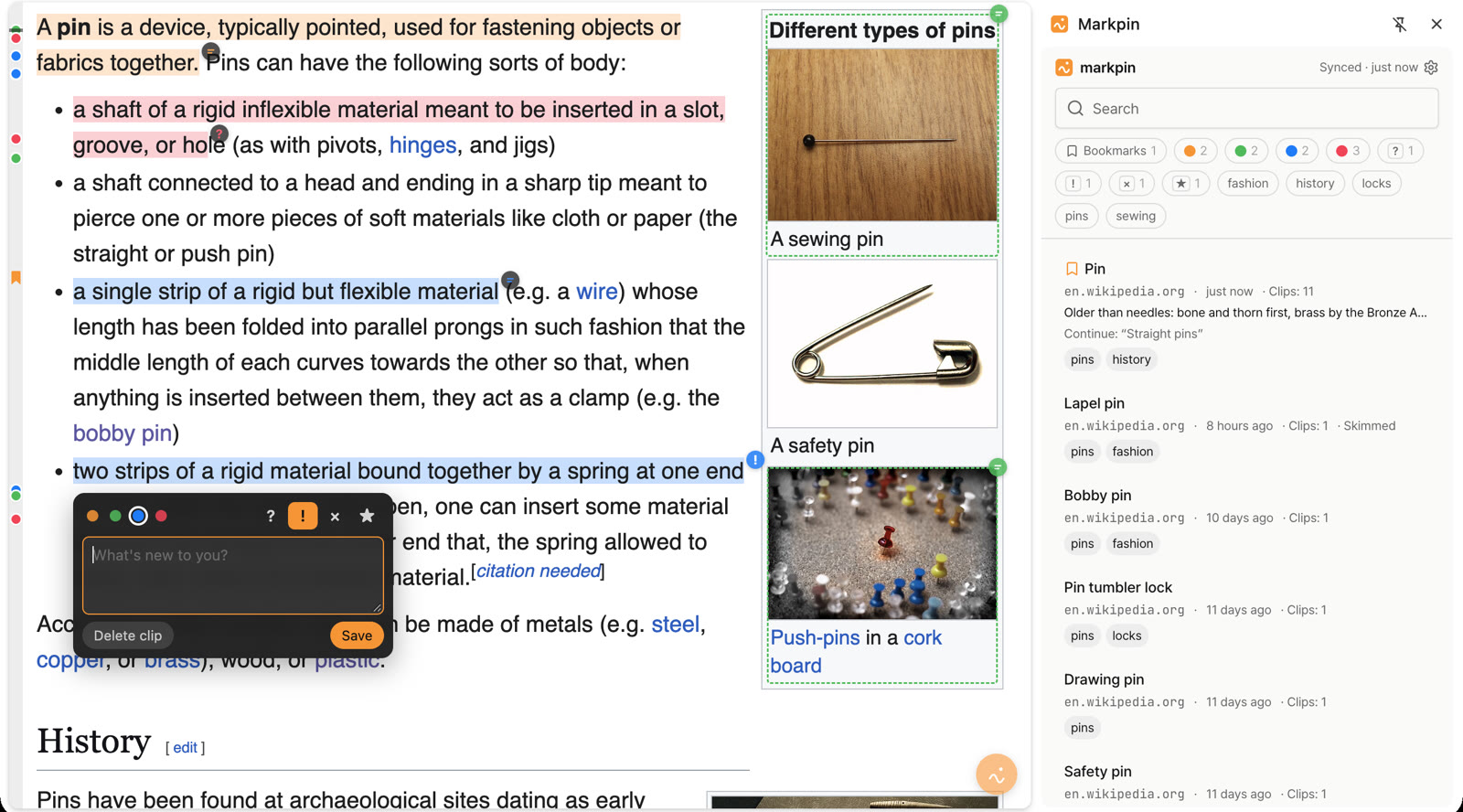
The selection toolbar now has two rows. The top row is [Clip] ? ! × ★. The bottom row has a dot for each of the other three highlight colors (Clip uses the current one), with Bookmark at the right end. One click on a color or a mark creates the clip. The marks stand for a question, something new, a disagreement and a key point. A clip has a color and at most one mark: color is for sorting, the mark is the reaction.
The note box that opens after a clip is saved now has a placeholder that depends on the mark: "Why did you mark this?" with no mark, "What are you wondering?" for ?, "What's new to you?" for !, "Why do you disagree?" for ×, and "Why does this matter most?" for ★. You can leave the box empty.
"Mark as read" opens a second box, "This page in one line", with the placeholder "One line, from memory" and a 500-character limit. The line shows under the title in the side panel and is searchable. There is also a third reading state next to bookmarked and read: skimmed. A page is in at most one of the three, and skimmed doesn't ask for a line.
All of this only adds keys, so the format is still v2. Here is the top of the same file after 1.2.0.
---
title: Example article title
url: https://example.com/article
savedAt: 2026-09-16T10:00:00.000Z
tags:
  - react
  - state
summary: One-line summary
note: Most of what I kept in global state was server cache
readAt: 2026-10-12T08:30:00.000Z
---

## Clips

> Quoted sentence

× only if every component reads it
The mark is a prefix on the note line under the highlight, and the machine block carries it per clip as "kind":"disagree" (the values are question, insight, disagree and star). The one line is the frontmatter property note. A skimmed page gets skimmedAt with an ISO time where this one has readAt. Empty values are omitted.
On the page, a 12 px rail along the left edge shows a dot per clip in its color, a ribbon for the bookmark and a gray line for where you left off. Clicking a dot scrolls there. The rail started on the right edge and moved left because it collided with macOS overlay scrollbars. Where you left off is recorded 1.5 seconds after scrolling stops. It lives in IndexedDB on that device and is never written to the Markdown file. Coming back triggers no toast or auto-scroll; the position only shows on the rail.
In the side panel, bookmarks older than 35 days get one card: "Bookmarks over 35 days old: N · Still want to read them?" Each page offers Keep, Mark as skimmed or Remove bookmark, and nothing is deleted.
In @markpin/mcp 0.9.0, add_clip accepts kind, and there are two new write tools: set_note (the one line; an empty string clears it, and it returns before and after) and mark_skimmed. Of the read tools, only get_page returns kind, note and skimmedAt; search and list_recent return summaries without them.
Permissions and outbound requests
Permissions are storage unlimitedStorage sidePanel activeTab alarms identity, plus the <all_urls> host permission; the content script runs on http and https pages. identity and googleapis.com are used only when you connect Drive. The extension makes no other outbound requests and has no analytics.
Two questions for you
On two of these decisions I'd rather hear from people who've used it than decide alone. There are no comments on this page, so write to support@markpin.dev.
- File format v2: human keys in frontmatter, machine data in a comment block at the end. If you use this in Obsidian or another Markdown tool, is there a point where the split gets in the way?
- The next thing I'm looking at is coming back to what you've read. Highlight review, your notes in one place, or local reading stats: I'd like to hear which should come first.